From our research notebook

How Broker Differences Change EA Behaviour

We describe the environment checks that help us explain why the same EA can behave differently across brokers.

When comparing an EA across trading environments, we cannot assume that the same file and inputs create the same conditions. Our integration and conversion work made symbol specifications, sessions and order rules part of the discussion.

We translate distances into the broker's actual units

Digits, point size, contract size and tick value affect prices and money risk. Minimum volume and volume steps affect the order that can actually be sent. We examine those properties before treating two apparently identical settings as equivalent.

We include the clock and the order path

Different session boundaries can change bars and time filters. Stop-distance restrictions, filling rules and netting or hedging mode can change order behaviour. Spread, commission and the available price history add further differences that deserve their own explanation.

We keep the environment beside the decision

We want records of the symbol and account assumptions used for sizing and execution. Invalid or missing properties should produce an understandable state. That helps us locate a difference in data, calculations or broker handling before changing the strategy itself.

Explore the technical detailOpen the full method, worked examples and implementation questions. We have kept this material here so you can follow the reasoning as far as you need.

The same EA file can produce different trades at two brokers without either terminal being broken. Symbol specifications, data, session times, spread, commissions, stop rules, order filling, and account mode all shape the decisions and the result.

The correct response is not to hard-code one broker’s values. It is to discover valid properties at runtime, validate assumptions, and record enough context to explain differences.

Field note · SHORT-07

Before comparing two brokers

Separate strategy decisions from the environment that carries them.

  1. 01
    SpecifyCompare symbol name, digits, point, contract size, tick value, volume step, and stop levels.
  2. 02
    ScheduleCompare server time, sessions, daily breaks, rollover, holidays, and history coverage.
  3. 03
    CostMeasure spread, commission, swap, slippage, and the price side used by each rule.
  4. 04
    ExecuteCheck account mode, filling policy, rejection codes, partial fills, and confirmed positions.

What changes

A fixed point distance can represent a different money risk when contract size or tick value changes. A session rule can open at a different moment when server offsets differ. A limit or stop may be rejected because the minimum distance or filling policy is not the same.

Practical check

At startup and before trading, read the symbol and account properties the strategy depends on. Reject invalid zero values, normalize price and volume, verify history and session state, and log the environment beside each decision.

  • Map broker symbol names without assuming suffixes.
  • Calculate money risk from current tick and contract properties.
  • Use explicit server-to-session time conversion.
  • Model spread, commission, swap, and slippage in validation.
  • Treat a successful request and a confirmed trade as different events.

Questions you may have

Why does an EA trade at different times across brokers?

Bar construction, server timezone, sessions, quote arrival, and spread can change when a condition becomes true.

Can optimization solve broker differences?

No. Parameters may adapt to one history, but portability still requires correct symbol, time, cost, data, and execution handling.
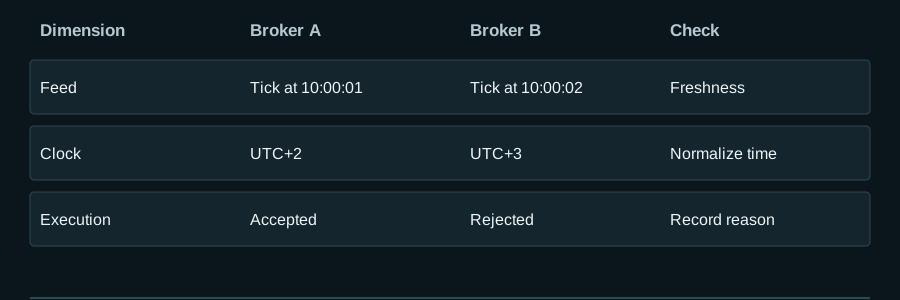
Separate feed, clock and execution differences

Scroll the diagram horizontally or open it at full size.

Separate feed, clock and execution differences
Educational design example — values and states are not live performance.

Illustrative observations, not an assessment of any named broker.

Open full diagram ↗

Separate feed, clock and execution differences

Two hypothetical brokers receive the same logical EURUSD request: risk $100, entry near 1.1000 and stop 50 points away. The figures show why symbol properties must be read from the active environment.

Controlled broker fingerprint comparison
Property Broker A Broker B Visible consequence
Digits / point / tick size 5 / 0.00001 / 0.00001 5 / 0.00001 / 0.00005 Valid prices on B must align to 0.00005; digits alone are insufficient
Tick value per 1.0 lot $1 per point $0.90 per point Raw size 0.20 vs 0.222… lots
Volume step 0.01 0.10 Allowed volume 0.20 vs 0.20 after round-down
Minimum stop 20 points 80 points Requested 50-point stop accepted by A, rejected or adjusted by contract at B
Server / session UTC+2; open UTC+3; symbol closed Same UTC signal may not be tradable
Fill mode IOC supported FOK only Same request needs a different declared fill policy

Each property needs a type, valid range and missing-data action. Tick size is an executable price increment; point is a quoting unit. Contract size, tick value, volume min/max/step, stops and freeze levels, sessions and fill modes are separate. If a required value is zero, missing or inconsistent, initialization fails safely.

Diagnose in layers. First compare normalized source bars and signal events to isolate feed differences. Next express decision time in UTC and server time to isolate clock/session effects. Only after signals match, compare request, rejection code, fill and slippage. Platform-mix labels in the archive are context, not empirical proof of a particular broker difference.

What to verify

  • Capture and version a symbol/account fingerprint before each deployment.
  • Run the same frozen signal and sizing case on both specifications.
  • Classify each difference as feed, time, sizing/property or execution before changing strategy logic.

Limits of this example

The brokers are hypothetical. Actual values and supported modes must be queried and validated on the intended account.

Editorial ownership and primary references

Reviewed by POLARIS Research

Evidence scope

This article combines official platform behaviour with recurring, anonymized implementation patterns. Exact trading rules and client material are excluded.

Primary references

These references support platform behaviour or research concepts. They do not validate POLARIS performance and do not guarantee future results.

Explore the next relevant layer

Move between focused research, system engineering and portfolio construction without losing the context of this page.

Contact POLARIS on WhatsApp